Free · macOS · Apple Silicon · All-in-One

The all-in-one AI app
for your Mac.

Chat, code, generate & edit images, convert models, serve APIs, and reason — all running locally. The only Mac AI app with 20+ agentic tools, Flux image generation + editing (Kontext, Fill, Qwen), Anthropic + OpenAI APIs, JANG & GGUF-to-MLX model converter, 5-layer caching, voice chat, vision models, speculative decoding, and 50+ architectures. No cloud, no API keys, no subscriptions.

JANG_QThe only MLX engine with mixed-precision quantization — 74% MMLU on 230B at 2 bits (82.5 GB) vs MLX 4-bit 26.5% (119.8 GB)
Free Forever Apple Silicon No Cloud 20+ Agentic Tools Image Gen Anthropic + OpenAI APIs Model Converter 50+ Architectures Voice & Vision pip install vmlx
MLX Studio
MLX Studio agentic coding interface — building a Tetris game with AI
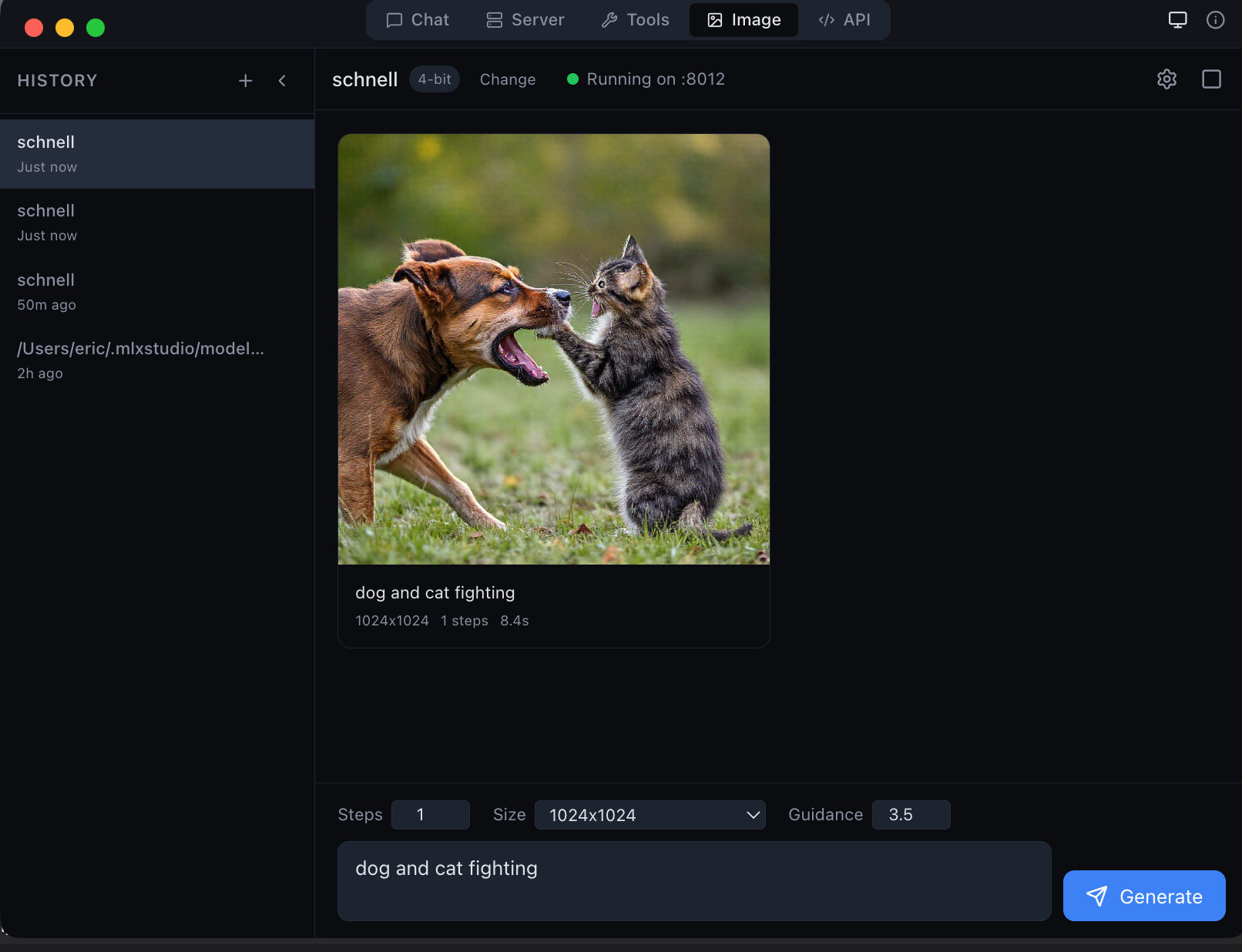
MLX Studio — Image Generation
MLX Studio local image generation with Flux Schnell on Apple Silicon

Local image generation with Flux Schnell — 1024×1024 in seconds on Apple Silicon

20+
Agentic Tools
224×
Faster at 100K context
50+
Model Architectures
11
API Endpoints
FEATURES

Everything you need. Nothing in the cloud.

Chat with any model, generate images with Flux, write code with 20+ agentic tools, use Anthropic or OpenAI APIs, convert models between formats — all running locally on your Mac. No API keys, no subscriptions, no data leaving your machine. Built for beginners who want a simple chat app and advanced users who need a full inference stack with KV cache quantization, prefix caching, speculative decoding, and 14 tool parsers.

Streaming Chat UI

Multi-turn streaming conversations with inline tool call pills, collapsible reasoning blocks, image previews, and real-time status indicators. Every detail crafted for clarity.

Image Generation & Editing

Generate and edit images locally. 5 generation models (Flux Schnell, Dev, Klein) + 4 editing models (Qwen Image Edit, Flux Kontext, Flux Fill). No cloud, no API keys.

Voice Chat

Built-in text-to-speech on every response. Listen to AI output hands-free using native Mac speech synthesis.

Vision & Multimodal

Drag and drop images into chat. Vision models like Qwen VL analyze visual content locally with click-to-zoom previews.

Reasoning Blocks

Collapsible thinking sections for models like DeepSeek R1, Qwen 3, and GLM. See the model's chain of thought.

Anthropic + OpenAI APIs

Native Anthropic Messages API endpoint alongside OpenAI Chat and Responses APIs. Use Claude Code, OpenClaw, Anthropic SDK, or any compatible client. Connect to remote endpoints too.

Model Converter

Built-in GGUF-to-MLX converter with standard profiles (Balanced 4-bit, Quality 8-bit, Compact 3-bit) and JANG mixed-precision profiles (2S through 6M). Convert any model without the command line.

HuggingFace Browser

Search, browse, and download MLX models directly in the app. One click to start chatting with any model.

5-Layer Caching Stack

Prefix cache, paged multi-context KV, KV quantization (q4/q8), continuous batching (256 sequences), and persistent disk cache. No other local app combines all five.

Speculative Decoding

Configurable draft model for 20–90% faster generation. The large model verifies draft tokens in parallel — same quality, fewer GPU passes.

50+ Architectures & 14 Parsers

Auto-detects Llama, Qwen, DeepSeek, Gemma, Mistral, Phi, GLM, Nemotron, MiniMax, Jamba, and more. 14 tool call parsers, 4 reasoning parsers — no manual configuration.

CLI: pip install vmlx

Open-source engine. pip install vmlx then vmlx serve model. Convert, benchmark, diagnose from terminal. Apache 2.0.

MCP Native Support

Built-in MCP (Model Context Protocol) server. Connect external MCP tools alongside the 20+ built-in tools. Auto-continue agent loops up to 10 iterations.

Hybrid SSM & Mamba

Dedicated BatchMambaCache for Nemotron-H, Jamba, and GatedDeltaNet architectures. The only local app that runs hybrid attention + SSM models correctly.

AGENTIC TOOLS

20+ built-in tools. Zero configuration.

The only local AI app with native MCP tool calling. Models can read, write, search, and execute — all running locally. oMLX, LM Studio, and Inferencer have no built-in agentic tools.

MLX Studio — Agentic Tools
MLX Studio agentic coding tools interface showing file I/O, code search, shell execution, web search, git integration, and clipboard tools

File I/O

read_file write_file edit_file list_dir copy move delete

Code Search

grep glob

Shell

execute_command

Web Search

duckduckgo_search brave_search

URL Fetch

fetch_url

Git

git_status git_diff git_log git_show

Utilities

clipboard_read clipboard_write current_datetime
IMAGE GENERATION

Generate & edit images locally on your Mac

5 image generation models (Flux Schnell, Dev, Z-Image Turbo, Klein 4B, Klein 9B) and 4 image editing models (Qwen Image Edit, Flux Kontext, Flux Fill, Flux Klein Edit). Submit a photo + text prompt to inpaint, transform, or restyle. Models download automatically. No cloud APIs, no subscriptions — runs entirely on Apple Silicon.

MLX Studio — Image Generation & Editing
MLX Studio image generation and editing — Flux Schnell, Dev, Z-Image Turbo, Klein, Qwen Image Edit, Flux Kontext, Flux Fill
CHAT

Streaming chat with reasoning & vision

Multi-turn conversations with collapsible reasoning blocks, inline code highlighting, image previews, and real-time token streaming. Drag and drop images for vision models. Per-chat temperature, top-p, system prompt, and max tokens. Chat history persisted in SQLite.

MLX Studio — Chat
MLX Studio chat interface with streaming responses, reasoning blocks, and code highlighting
MODELS

Browse & download models in one click

Built-in HuggingFace model browser. Search MLX models, filter by text or image, see sizes and architectures, and download with one click. Pre-quantized JANG models from JANGQ-AI ready to run.

MLX Studio — Model Browser
MLX Studio HuggingFace model browser showing JANGQ-AI pre-quantized models
ALWAYS ACCESSIBLE

Menu bar controls

Live server status, quick model switching, and session controls — always one click away in your menu bar. Start/stop models, check GPU usage, and manage sessions without opening the main window.

MLX Studio menu bar showing server status and quick controls
Powered by · Open Source
vMLX Engine

Now open source at github.com/jjang-ai/vmlx — install with pip install vmlx. The only local AI engine on Mac with a 5-layer caching stack: prefix cache, paged KV, KV quantization (q4/q8), continuous batching, and persistent disk cache. Serves both Anthropic Messages API and OpenAI-compatible endpoints — use Claude Code, OpenClaw, Anthropic SDK, or any compatible client. 50+ architectures, 14 tool parsers, 4 reasoning parsers, Mamba/SSM hybrids, speculative decoding.

2.5K context
vMLX 0.05s
Others 0.49s
9.7× faster
Time to first token
10K context
vMLX 0.08s
Others 6.12s
76× faster
Time to first token
100K context
vMLX 0.65s
Others 131s
224× faster
Cold prompt processing
Prefix caching — repeated parts of your conversation are computed once and reused
Paged KV cache — all your chats stay in memory, no eviction when switching
Cache quantization — q4/q8 reduces cache memory 4–8×, enabling longer contexts
Continuous batching — handles up to 256 concurrent sequences efficiently
Disk cache — prompt computations survive app restarts for instant warm starts
Apple Silicon native — built on MLX, not llama.cpp, optimized for unified memory
API Reference — Anthropic + OpenAI Endpoints
MLX Studio — API Reference
MLX Studio API reference page showing Anthropic Messages API and OpenAI-compatible endpoints
Model Converter — GGUF-to-MLX & JANG Profiles
MLX Studio — Model Converter
MLX Studio GGUF-to-MLX model converter with standard and JANG quantization profiles
FAQ

Frequently asked questions

MLX Studio is a free macOS app for AI chat and agentic coding. It is the only local AI app on Mac with native prefix caching, paged KV cache, KV quantization, continuous batching, hybrid SSM support, and full VLM integration. It includes 20+ built-in tools for file editing, code search, shell execution, web search, and more — all powered by the vMLX Engine running locally on Apple Silicon.
MLX Studio is the app — the chat UI, agentic tools, model browser, and settings interface you interact with. vMLX Engine is the inference backend that powers it — the caching, batching, model loading, and API layer. Think of it like LM Studio and llama.cpp.
Only to download models initially. All inference runs locally on your Mac with no cloud connection, no API keys, and no data leaving your device.
Any Mac with Apple Silicon (M1 or later) running macOS 26 (Tahoe). 8 GB RAM minimum, 16 GB+ recommended. Remote endpoints work on macOS 14+.
Yes. Connect to OpenAI, Anthropic, Groq, or any OpenAI-compatible endpoint. Studio's agentic tools work with both local and remote models.
20+ tools across 7 categories: file I/O (read, write, edit, copy, move, delete), code search (grep, glob), shell execution, web search (DuckDuckGo, Brave), URL fetch, git (status, diff, log), and utilities (clipboard, date/time).
Yes. Every response has a TTS playback button. Vision models like Qwen VL accept image input via drag-and-drop with inline previews.
Yes. Completely free, code-signed, and notarized. No subscriptions, no usage limits.
The GGUF for MLX · Open Source

JANG — Better Quality at Every Size

GGUF gave llama.cpp K-quants. JANG does the same for MLX — smart bit allocation that protects attention layers. On Qwen3.5-122B: 94% MMLU (JANG_4K, 69 GB) vs 90% for MLX 4-bit (64 GB). At 2 bits: 84% MMLU (38 GB) vs 46% for MLX mixed_2_6 (44 GB).

JANG_4K · 122B · 3.99b
94% MMLU · 69 GB
+4 points vs MLX 4-bit (64 GB, 90%)
JANG_2S · 122B · 2.11b
84% MMLU · 38 GB
+38 points vs mixed_2_6 (44 GB, 46%)
MiniMax-M2.5 (230B) — JANG vs MLX
200-question MMLU
JANG_2L · 2.10 bits · 82.5 GB
74%
MLX 4-bit · 119.8 GB
26.5%
JANG at 2 bits scores 3x higher than MLX at 4 bits using 37 GB less RAM. MLX is broken at all bit levels on this model.
View per-subject MMLU breakdown (10 topics)
Subject JANG_2L 4-bit 3-bit 2-bit
Abstract Algebra10/203/202/205/20
Anatomy15/207/205/205/20
Astronomy20/207/206/204/20
College CS13/204/205/206/20
College Physics13/208/206/206/20
HS Biology18/204/205/206/20
HS Chemistry18/204/205/205/20
HS Mathematics8/206/206/203/20
Logical Fallacies18/205/204/205/20
World Religions15/205/205/205/20
Total148/200 (74%)53/200 (26.5%)49/200 (24.5%)50/200 (25%)

JANG wins all 10 subjects. MLX 4/3/2-bit all score near random (25%). Root cause: MLX generates meta-commentary instead of answers.

jangq.ai GitHub

Start chatting locally

Download MLX Studio and run AI on your Mac in under 60 seconds.